Headers & Chapter Layout
Structure your chapters and headers so your book flows cleanly from page to page.
Chapter Layout Basics
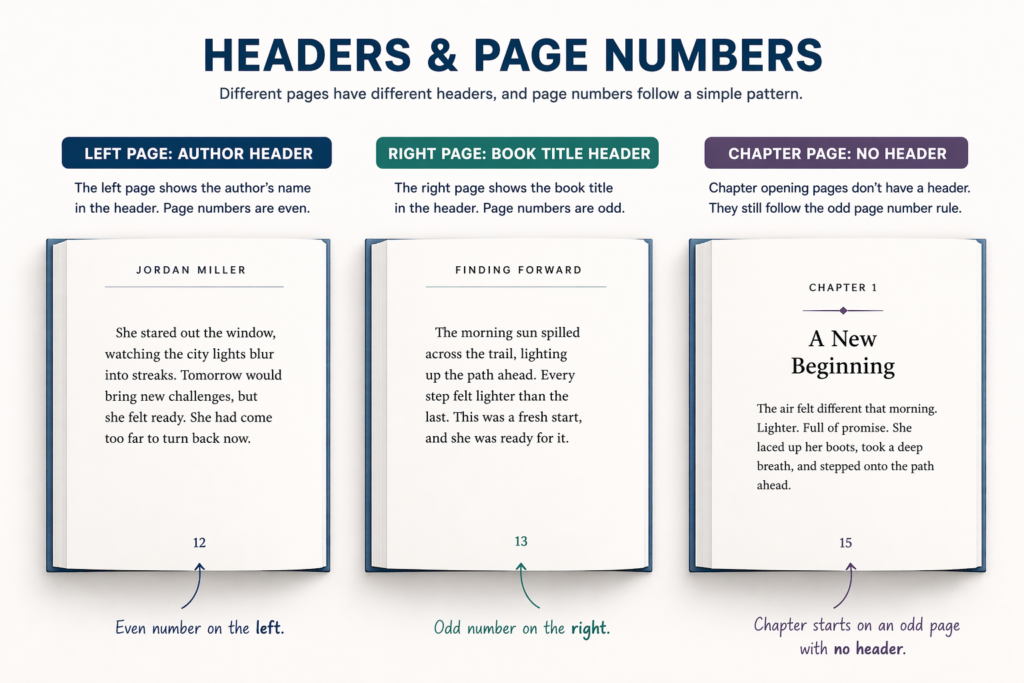
- Chapters typically start on the right-hand page
- Begin with:
- chapter title
- extra spacing
- No header
- No page number (usually)
What Happens After the Chapter Page
- Next page = normal text page
- Headers return (if used)
- Page numbers visible
This is where your book returns to its standard reading layout.
How Headers Work in a Book
Headers typically:
- Alternate between left and right pages
- Stay consistent throughout
Common setup:
- Left pages → Author name
- Right pages → Book title
How to Set Up Headers (Word)
Keep it tight (you don’t need to re-teach everything):
- Insert → Header
- Enable:
- Different First Page
- Different Odd & Even Pages
- Set:
- Left pages → Author
- Right pages → Title
Where Headers Do NOT Appear
- Chapter opening pages
- Title page
- Copyright page
- Table of Contents (optional, but usually omitted)
Keeps layout clean and intentional
Consistency Rules
- Same header style throughout
- Same placement
- Same spacing
- Headers should match your book’s font and tone
Inconsistency is immediately noticeable in print
Common Mistakes
These mistakes can immediately make a book feel unpolished:
- ❌ Headers showing on chapter pages
- ❌ Same header on both sides
- ❌ Inconsistent formatting
- ❌ Forgetting “Different First Page”
Headers are subtle, but when done correctly, they quietly guide the reader and reinforce a professional layout.